변호사가 리테이너를 요구할 때는 먼저 착수금인지 선금인지를 분명히 하셔야 하는데요.
간단히 설명하자면 (1) 착수금은 환불이 되지 않는 일종의 계약금이라고 보시면 되고, (2) 선금은 앞으로 발생할 변호사 비용에 대해 미리 지불해 두고 발생할 때마다 차감해 나가는 balance를 의미합니다. 더 자세한 내용은 리테이너에 대한 글 참고 바랍니다.
이번 글에서는 적정한 리테이너의 금액에 대해 알아보겠습니다.
(more…)
Atlanta law firm for global business
변호사가 리테이너를 요구할 때는 먼저 착수금인지 선금인지를 분명히 하셔야 하는데요.
간단히 설명하자면 (1) 착수금은 환불이 되지 않는 일종의 계약금이라고 보시면 되고, (2) 선금은 앞으로 발생할 변호사 비용에 대해 미리 지불해 두고 발생할 때마다 차감해 나가는 balance를 의미합니다. 더 자세한 내용은 리테이너에 대한 글 참고 바랍니다.
이번 글에서는 적정한 리테이너의 금액에 대해 알아보겠습니다.
(more…)
블랙 햇(black hat)은 악의적인 목적으로 컴퓨터 시스템에 조작하거나 활용하는 사람을 말합니다. 아마존은 특히 셀러들이 아마존 셀러 센트럴 (Amazon Seller Central) 이라는 자동화된 컴퓨터 시스템을 통해 리스팅부터 판매, 배송의 모든 단계를 직접 관리하도록 되어 있어서 일부 판매자의 블랙 햇 활동이 큰 문제가 되고 있죠.
가장 원초적인 방법으로 경쟁업체의 리스팅에 대해 신고를 하는 방법이 있습니다. 말이 되지 않는 가짜 고발이라고 할지라도, 상표도용이나 허위광고 등에 대한 신고가 들어가면, 아마존에서 내부 검토가 이루어지는 동안 일시적으로 판매중단 조치가 이루어 지는게 보통이기 때문에, 이런 신고 및 제재가 매출이 큰 기간(주말이나 연휴 등)에 이루어진다면 판매에 큰 타격을 입겠죠.
거짓으로 부정적인 리뷰를 작성하는 고전적인 방법도 있지만, 한 걸음 더 나아간 방법으로, 경쟁업체의 리스팅에 허위로 긍정적인 리뷰를 작성하여 해당 리스팅이 제재를 받도록 하는 방법입니다.
온라인에서는 리뷰가 워낙 큰 역할을 하기 때문에, 허위로 판매자가 직접 혹은 제3의 업체를 고용해 리뷰를 생산해 내는 경우가 있는데, 이에 대해 아마존에서 강력한 제재를 하고 있다는 점을 노린 방법이죠. 아마존의 허위 리뷰 단속을 역으로 이용해, 오히려 경쟁 제품 리스팅에 별 다섯개 짜리 리뷰를 허위로 다수 올리게 되면, 아마존에서 적발및 제재를 가할 수 있습니다.
허위 리뷰에 대한 적발은 단순히 리뷰의 내용만이 아니라, 해당 리뷰 작성자의 과거 구매 기록, 주소, 결제 정보 등을 복합적으로 이용하여 자동 색출하기 때문에 놀라울 정도로 효율적입니다. 따라서, 이상하리만치 좋은 리뷰가 계속 올라온다면 경계할 필요가 있습니다.
한 품목을 판매하는 여러 셀러들 간에 중복 리스팅을 방지하기 위해 아마존에서는 모든 셀러가 한 품목에 대해 하나의 리스팅을 공유하도록 되어 있죠. 따라서, 같은 공장에서 생산된 제품이라도 라벨을 바꾸거나 UPC 를 달리하는 방법으로 다른 상품과 구분 짓는 경우가 많은데요.
이렇게 자신만 판매할 수 있는 품목이라 할지라도 악의를 가진 제3자가 해당 품목 리스팅에 접근하는 것을 막을 방법은 현재 아마존 브랜드 레지스트리 밖에 없습니다. 브랜드 등록이 되어 있지 않다면, 실제로 물건을 판매하고 있지 않은 셀러라고 할지라도 해당 리스팅에 쉽게 접근할 수 있고, 리스팅에 허위 사실을 기재한 뒤 아마존에 신고하거나, 소비자의 인식이나 평가에 악영향을 끼칠 수 있는 문구나 이미지를 기재, 다른 리스팅과 결부(parent-child paring)시키는 방법 등으로 리스팅을 하이재킹할 수 있습니다.
블랙 햇은 흔히 말하는 컴퓨터 해커와 같이 시스템의 결함이나 헛점을 이용하기 때문에 블랙 햇 행위 자체가 범죄 행위가 되는 경우는 드뭅니다. 예를 들면, 타인이 생성한 리스팅의 내용을 변경하는 행위는 아마존이 허락한 행위이고 문제가 없습니다. 다만, 그 내용이 허위 사실이기 때문에 허위 사실의 유포가 법적 문제가 될 수 있는 것이죠.
이러한 악의적 행위는 물론 아마존 셀러 센트럴의 이용약관에 매우 포괄적으로 금지되어 있기 때문에 분명한 약관 위배입니다. 하지만 이용약관은 판매자 간의 갈등이나 분쟁의 예방과 해결보다는 아마존을 보호하기 위한 법적 장치라고 볼 수 있죠.
결국은 아마존에서 얼마나 문제 해결을 위해 노력하느냐가 중요하고, 물론, 아마존에서도 정직하고 합법적인 판매자들의 참여와 판매를 장려해야 하기 때문에 문제 해결에 적극적일 수 밖에 없겠죠.
피해를 입은 셀러 입장에서도 할 수 있는 일이 있습니다. 우선 블랙 햇 공격에 의해 발생한 피해는 민사 소송으로 보상 받을 수 있습니다. 예를 들어, 허위 사실을 근거로 신고를 해서 판매가 중단됐다면, 허위 사실의 유포와 판매 중단으로 인한 손해의 인과 관계는 뚜렷하다고 볼 수 있죠. 또한, 지난 판매 기록을 근거로 판매액의 산출도 쉽습니다.
반면에, 누가 가해자인지를 찾는 것은 어려울 수 있습니다. 신고나 리뷰, 리스팅 내용의 진위 여부도 분명히 흑백을 가리기 어려운 부분이 있을테고, 선의와 악의를 가리기는 더더욱 쉽지 않습니다. 게다가 모든 아마존 셀러는 아마존 입장에서는 고객이기 때문에 한 고객의 말만 믿고 다른 고객의 개인정보를 제공하는 것은 쉽지 않겠죠.
예를 들어, 신고 내용의 진위 여부에 다툼이 있을 경우마다 신상을 공개한다면, 선의의 신고자가 신상정보 노출로 피해를 볼 가능성도 있습니다.
그렇다면 방법이 없을까요? 아니겠죠. 미국 민사 소송은 익명의 가해자에 대해서도 가능합니다. 미국 사법체계는 상당히 원고의 편의를 많이 봐주는 편인데요. 예를 들어, 익명의 가해자에 대한 소송을 제기한 후, 아마존이 블랙 햇의 신상 정보를 제공하도록 법원 명령(subpoena)을 요청할 수 있습니다.
아무래도 소송은 비용 대비 효율이 높지 않습니다. 예를 들어, 애를 써서 가해자를 찾아내고 손해 배상 판결을 받아도 가해자가 파산 신고를 해버리면 아무런 보상을 받을 수 없는 상황이 발생할 수 있겠죠.
물론, 아마존이 문제 해결을 위해 합리적인 노력(신고 내역에 분쟁이 있을 경우 관련 조사 및 해결 등)을 하지 않으면, 플랫폼 제공자인 아마존에게 책임이 있을 수도 있습니다. 하지만 이에 대한 피해 보상은 이용약관에 의해 매우 한정적으로 제한되어 있죠.
이 때문에 가장 실질적이고 효율적인 대응책은 아마존이 제공하는 다양한 분쟁 해결 방법을 이용하는 것입니다. 그 중 하나가 Amazon 아마존 브랜드 레지스트리에 등록이 된 셀러가 자신의 브랜드 제품을 판매하는 제3의 판매자를 직접 규제하고 단속하게 하는 Amazon Project Zero 입니다.
또한 블랙 햇에 의한 피해를 입었다고 판단될 경우, 이러한 정황과 입수할 수 있는 정보를 아마존에 적절히 통보하고, 적극적인 대응을 요청하는 것이 중요합니다. 아마존 입장에서도 적절히 대응하지 않을 경우, 아마존 판매 플랫폼의 신뢰도가 떨어질 뿐 아니라, 소비자의 피해도 발생하고, 더 나아가 아마존의 고객이라고 할 수 있는 판매자를 보호할 의무에 대한 불이행이 될 수 있습니다.
따라서, 아마존 셀러 센트롤을 통해 할 수 있는 (1) 아마존 브랜드 레지스트리 등록과 (2) 리스팅에 대한 주기적인 모니터링, 관리 등을 우선으로 하되, 브랜드 등록이 어렵거나 직접 해결할 수 없는 상황이 발생할 경우 판매자/고객으로써 아마존의 대응을 적극적으로 요청(아마존 셀러 센트럴에서 “Appeal” 및 관련 상담 창구 Community Help Email 등 이용) 하시기 바랍니다.

미국 상표 등록은 본인이 직접 혹은 미국 변호사를 통해 진행 가능합니다. 본인이 미국에 거주하고 있지 않다면, 반드시 미국 변호사를 통하도록 되어 있지만 불과 몇 년되지 않은 다소 국수주의적 규정이죠.
상표 등록을 본인이 직접할 수 있는 이유 중 하나는 미국 상표법의 “사용 주의” 때문으로, 실제 상표권은 “사용”에 의해서 발생하고, 상표 등록은 부동산 등기와 비슷한 개념입니다. 본인이 이미 가지고 있는 권리를 직접 등기할 수 없다면 말이 되지 않겠죠.
하지만 스스로 혼자 상표 등록을 하기 위해 출원서를 제출했다가 일처리가 잘못되거나 등록이 거절되면, 중복 비용이 발생하고 시간 낭비를 하게 됩니다.
따라서, DIY 를 하면 좋은 경우와 아닌 경우를 함께 알아보겠습니다.
(more…)The USPTO provides ample resources to guide first-time DIY-ers through the trademark application and registration process. However, it does not give you much regarding when and how you should decide to seek expert help. Here comes a seasoned IP attorney’s take on “when should you go the DIY route.”
(more…)
아마존 웹서비스(AWS)에서 빝나미(Bitnami)를 통해 제공하는 라잍세일(Lightsail)은 전문가가 아니라도 누구나 손쉽게 워드프레스(WordPress) 웹사이트를 AWS의 EC2 클라우드 가상서버에서 운영할 수 있도록 도와줍니다.
사실 출시는 2016년에 되었다고 하지만, GoDaddy 나 HostGator, BlueHost, SiteGround 등의 다양한 기존 서비스가 있기에 크게 알려져 있다고 보기는 힘든 상태죠.
(more…)
요즘 아마존에서 창업하시는 분들은 아무리 소규모로 시작하시더라도 상표권에 관심이 많으십니다. 아마존 브랜드 레지스트리 덕분이죠. 헌데, 특히 미국에서 비즈니스를 해 본 경험이 없으신 분들은 상표권과 친숙하지 않은 경우가 많습니다.
이런 분들을 위해 어떻게 보면 “상식”이라 할 수 있는 아주 기본적인 상표권의 개념을 소개해 드립니다. 적어도 소제목이라도 훑어 보시고, 생소한 부분이 있다면 자세히 살펴보시면 좋겠습니다.
(more…)
You will hear many patent practitioners tell you against DIY if not all. And there are many good reasons. However, if you are in a situation where you simply cannot justify spending legal fees, you should be able to file an application yourself if you have enough time.
Patent is a right given to an inventor of a thing (or a way to do things). When a patent is granted to the inventor, then, he or she can legally exclude others from making, using, or selling the thing (or the way to do things).
Patent has been there for the entire history of the U.S. as it is written in the U.S. Constitution:
[The Congress shall have power to] promote the progress of science and useful arts, by securing for limited times to authors and inventors the exclusive right to their respective writings and discoveries.
U.S. Constitution Section I Clause 8
As such, it is fairly well defined by the statutes and regulations as well as case laws, which means businesses can rely on them more than anything when it comes to guarding them against copycats.
Patent recognizes not only the first person who thought of it, called the inventor, but also the first person who brought it to the patent office. In other words, you want to be the person who first filed a patent application. If two people thought of the same thing, the first one to file a patent application will likely get patent right.
If you are certain that no one will think of the same thing, you can sit on it until the right time to file. In this case, it is important not to disclose it to anyone, including by using it in the public.
If you have to disclose it or publish it or others will soon catch up, you’d better hurry up.
The government essentially let you have a monopoly for a limited time when it grants a patent to you. Instead, you will disclose your invention to the extent that other people with ordinary skills in the same field can understand and use your invention.
For a limited time period, which is usually 20 years, you will enjoy the government sanctioned monopoly, and after that, it should become a level playing field.
This allows many others to continue to make improvements based on what you have made. So, the government can “promote the progress of science and useful arts” as written in the Constitution.
Getting a patent is a burdensome process incurring significant monetary expenses. Your application is unlikely to get examined in a few months (unless you get prioritized examination), and most applications stay untouched for more than a year. Thus, the patent law allows you to claim “patent pending” status to warn others against infringement of your potential right.
You probably have seen “patent pending” mark somewhere. In fact, it is a great marketing phrase because many people associate patent with innovation and being desirable.
The patent pending status can be obtained when a patent application is filed, including provisional applications. What is provisional application? Essentially, they simply claim that you have invented a thing. Your provisional application will not be examined by the USPTO. Instead, a non-provisional application should be filed within a year from the provisional filing date if you want to get it examined and thereafter potentially patented.
A provisional application is not only a great first step toward getting your invention patented but also a great money saving option. For one, you do not need legal expertise to file a provisional because it will not be examined (although you need to be very careful about what is included in your provisional). When a year has passed from filing a provisional, you can then reevaluate your options, including entirely dropping the plan to patent it. If you do not file a follow-up non-provisional, the provisional application will never see the sunlight (i.e. will not get published), so you do not need to worry about premature disclosure to the public.
From here on, we will focus on filing a provisional patent application because for non-provisional, you definitely need an expertise, and if you already have one, you are certainly not the target audience of this article.
As a provisional application is never examined, you only need to file literally any writing. Your experiment note or a journal entry about your invention can work for this purposes.
However, when the serious time comes and you file a non-provisional, the examiner will review your provisional and see if there is any new matters introduced in the non-provisional. If you want to claim the early filing date (of provisional), there should be no new matter.
New matters are often associated with improvements and undisclosed specifics of the invention, but oftentimes, the examiner will simply reject anything that was not in the original provisional application.
Therefore, although provisional applications need not to be perfect, they need to be thorough. To be as thorough as possible, you should definitely check out how issued patents look like.
I suggest you use Google Patents to find a patent that was examined and granted (i.e. an “issued” patent). All non-provisional applications get “published” at some point, but not all of them get patented.
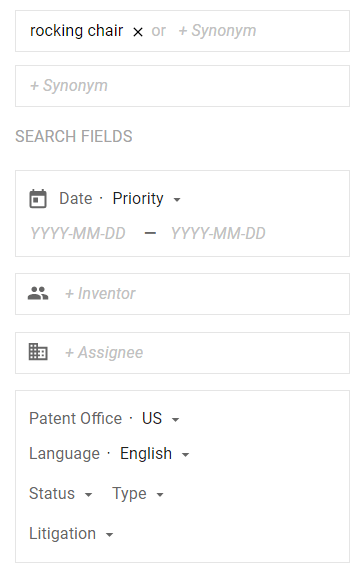
Preferably, you want one in the same field as your invention. For example, if you have invented a better rocking chair, you can search “rocking chair” in Google Patents. Then, choose “Patent Office—US” and “language—English”.
From the search result, “Gliding rocking chair and ottoman” as shown below was filed relatively recently (in 2010).
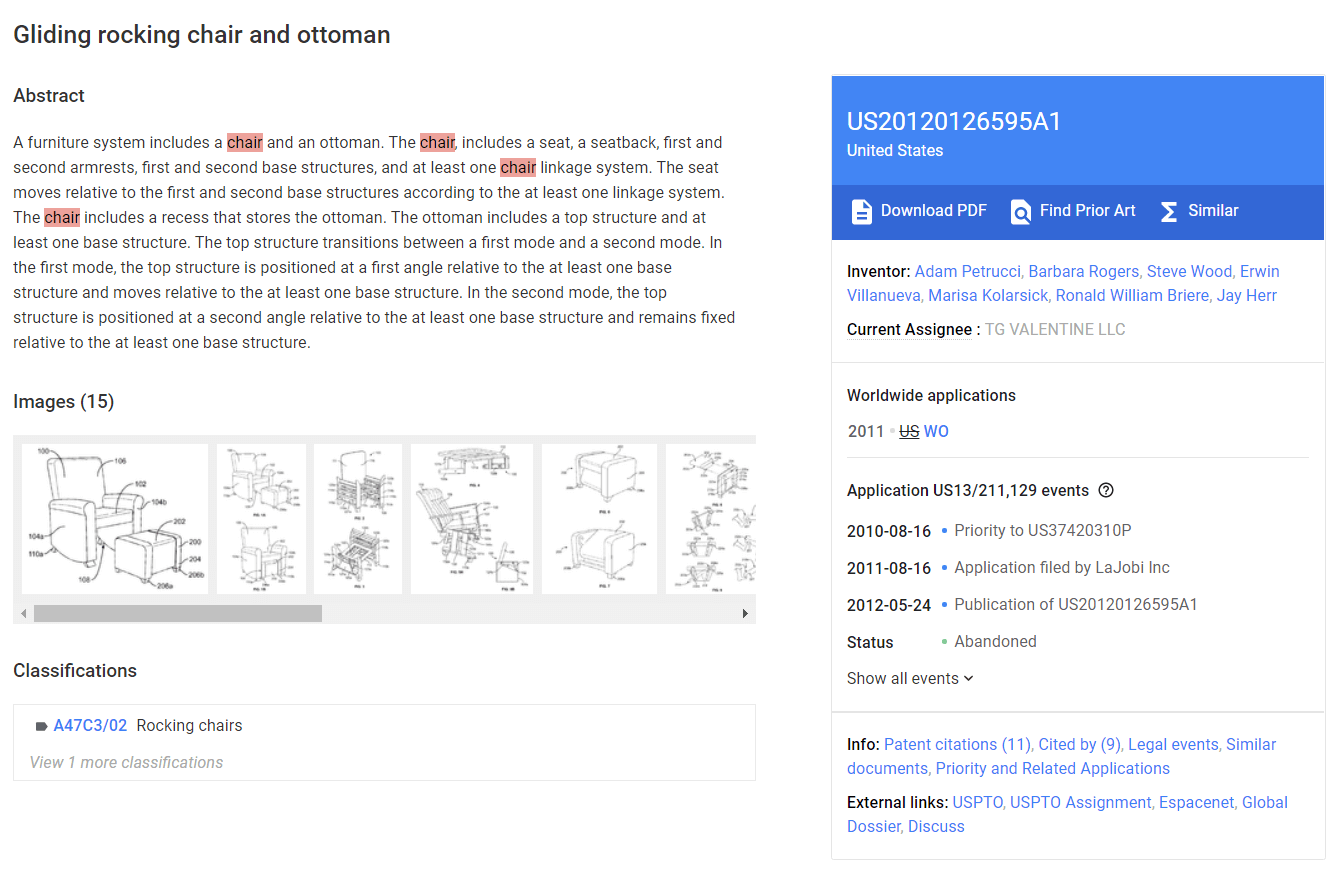
Now you see “Download PDF” button in the blue box. This allows you to download a full image of the published application. As you can see on the “Status” line, this application was never patented but “[a]bandoned”.
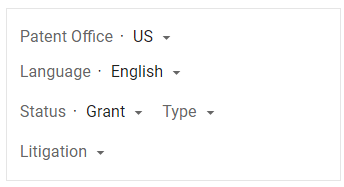
Well, many patent applications get abandoned but all non-provision applications are published. So, you may want to see only patented cases. Go back to the search result and choose “Status—Grant”.
Now, I found “Rope rocking chair” filed in 2016.
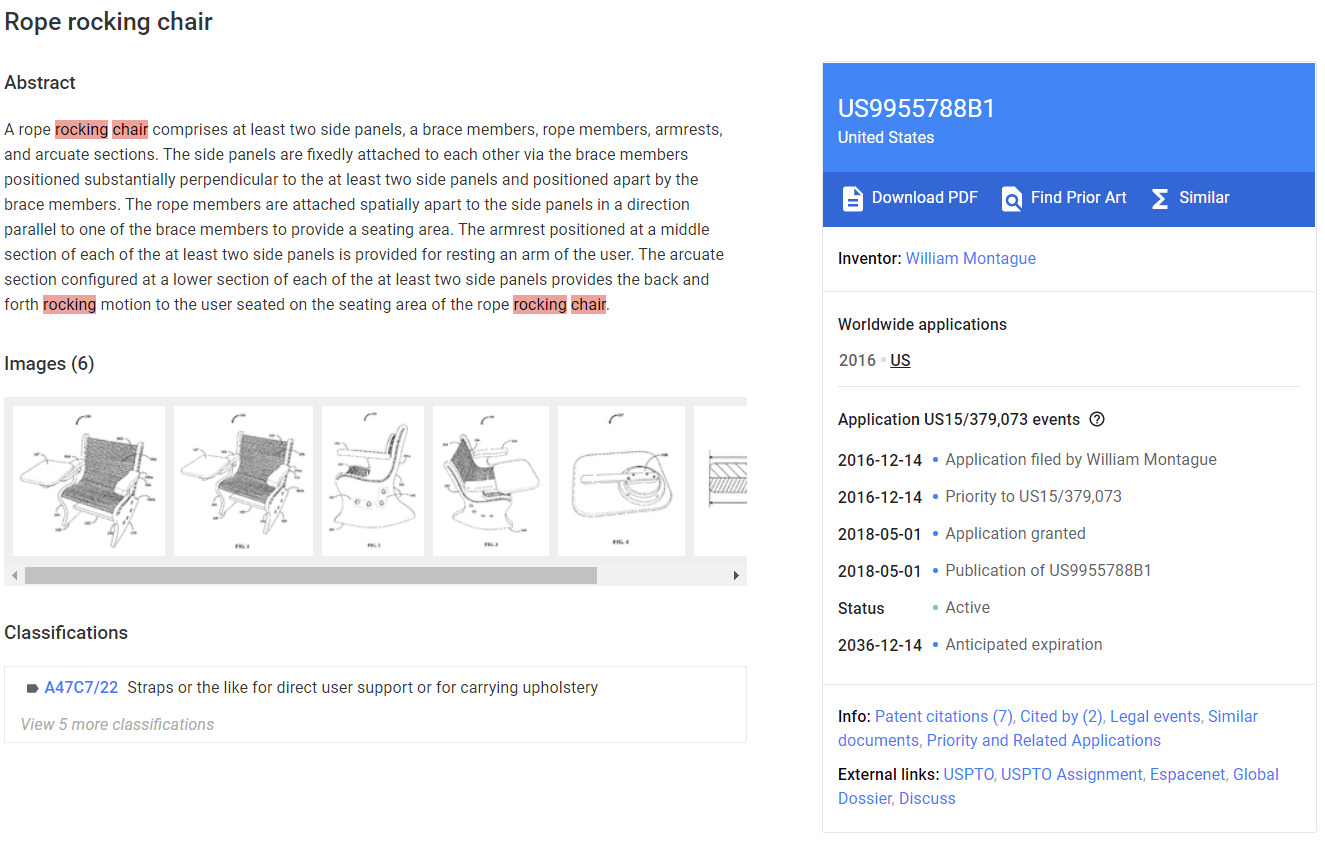
Download PDF and you’ll find the followings:
This part is a summary of your invention, but it is not required in provisional.
Not always required, but if your invention is a physical thing, you’d better have them prepared. A picture can say more than a hundred words. Also, if you don’t have a drawing in a provisional application, getting drawing included in a follow-up non-provisional can be tough.
If you have 3D CAD image, you want to produce more than one view. If you absolutely can’t draw, take a picture of your prototype and make it black-and-white as a last resort.
Find the following headings: Technical Field, Background, Summary, Description of Drawings, and Detailed Description. You need all of them.
Write as if you are explaining your invention to your peers, so they can make it themselves. Not the investors or customers. This is important.
You won’t need claims in your provisional.
Everything can be done online. The USPTO has utilized electronic documents for a long time, and although its Electronic Filing System may look very outdated, it works alright.
Note, the system is not fool-proof, meaning you can submit an incomplete application without any warning. On the other hand, it will check your electronic files for compatibility.
Access the EFS using the following link. You can use it as unregistered eFiler without registration.
United States Patent & Trademark Office (uspto.gov)
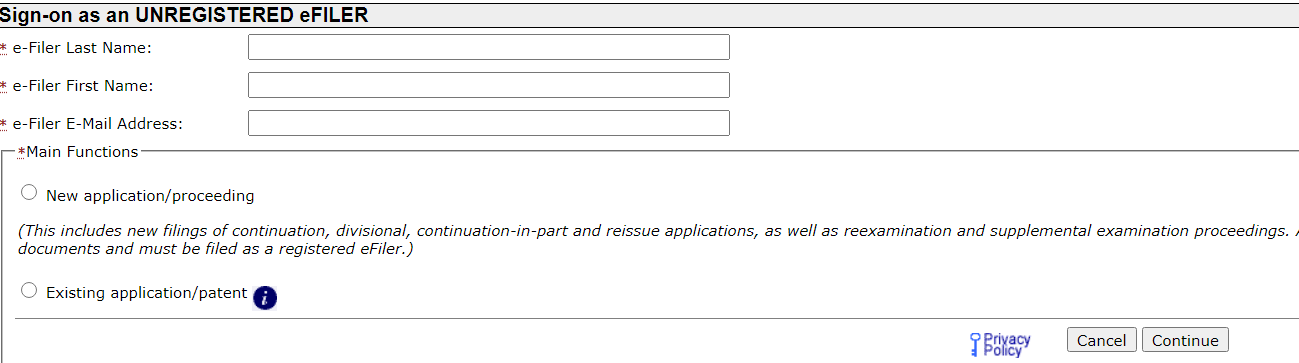
Simply write down your name and email address, then choose “New application/proceeding” as below.
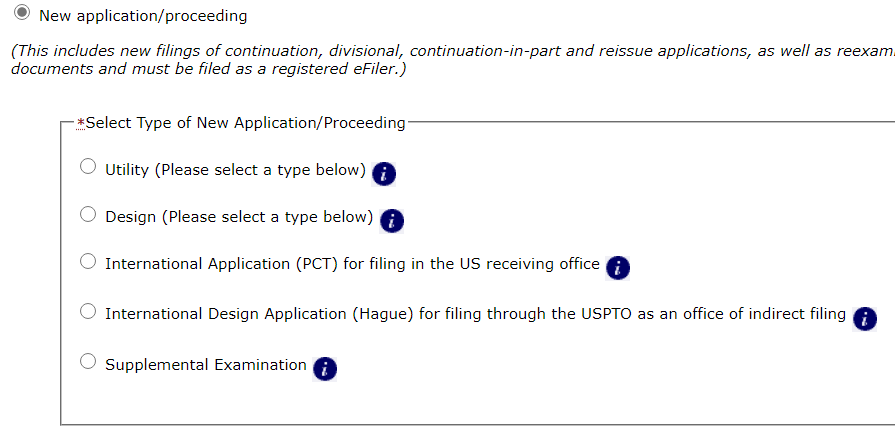
Provisional is only available for utility patent, so choose “Utility”.
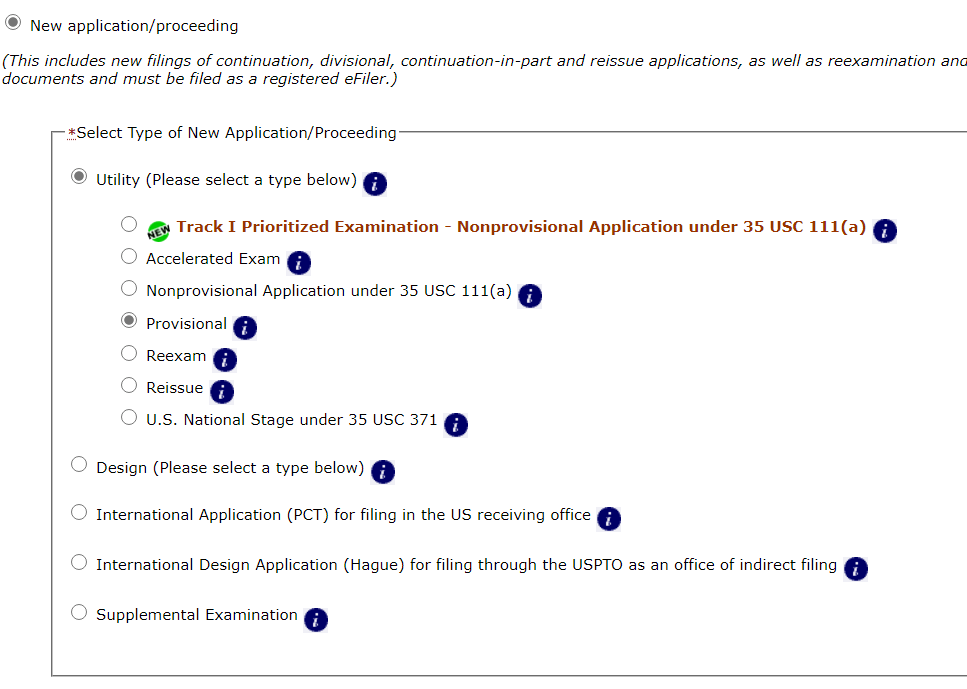
Utility patent is what we usually think a patent is. On the other hand, design patent protect non-functional ornamental features. Learn more about design patent here.
The first step is providing a set of basic information, collectively called “Application Data”. This is actually very important, so be careful and double check. Also, Application Data Sheet is a required part of any patent application.

If you choose Web-based ADS, you don’t need to get a PDF form elsewhere. When you select Web-based ADS, the page will be populated with additional boxes.
The following boxes must be filled.
Inventor information
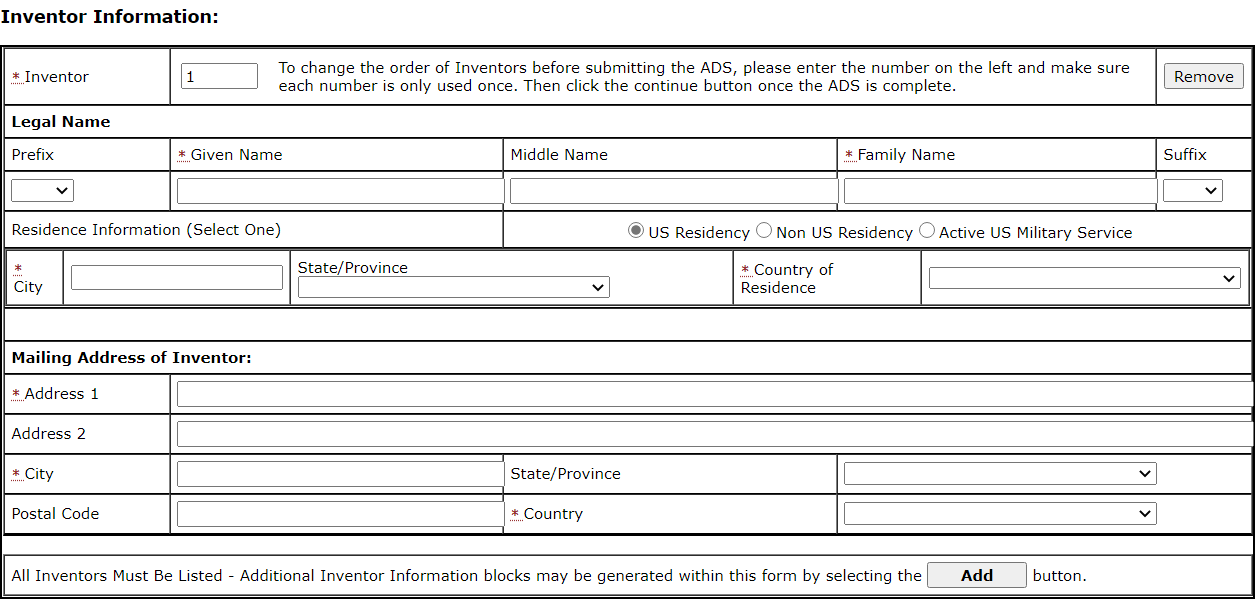
It’s about who invented the invention. Easy.
Next, your contact info.
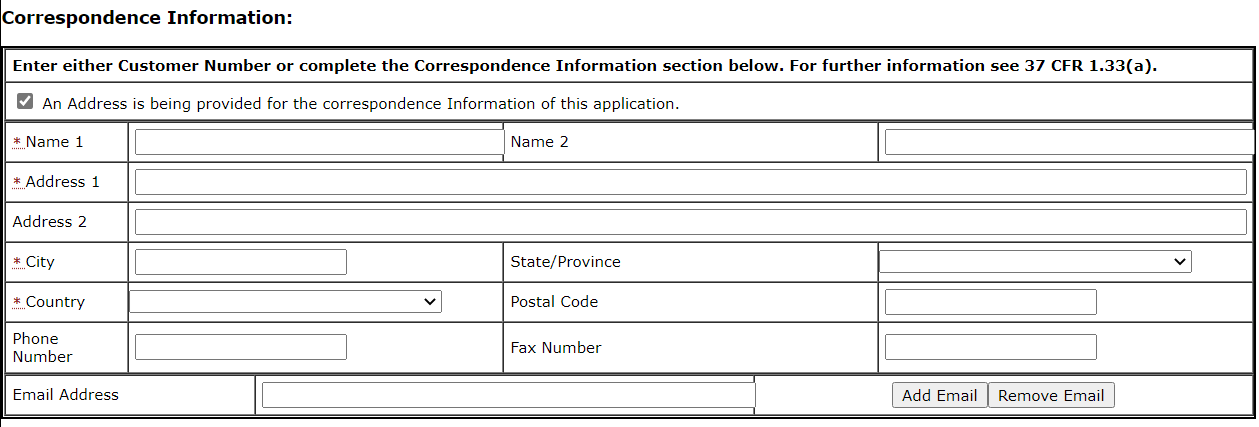
Check “An Address is being provided for the correspondence information of this application” to see the all blanks. This form is interactive, so you often need to check some items to see the entire form.
Because you are probably an inventor/applicant, you will write down all the same information about yourself in the corresponding fields. By the way, if you want your company to have the patent right, you can simply substitute your company for the applicant.
Next, you will provide information about your invention.

Just name your invention in a few words. As you’ve seen, “Rope Rocking Chair” was fine.
You probably want to check “Small Entity Status Claimed”. You will get 50% discount on your government fees, if you are not a company with 500 employees or more.
If you’re gross income is less than a certain limit specified on Micro Entity Status Gross Income Limit | USPTO, you may qualify for Micro Entity Status, which gives additional 50% discount. Eventually, you will pay only 25% of the standard government fees.
To get Micro Entity discount, you need to upload an additional form called “Certification of Micro Entity Status”. You can find a current form on Forms For Patent Applications Filed On Or After September 16, 2012 | USPTO. You can upload the form with your application parts as explained in the later part of this article.
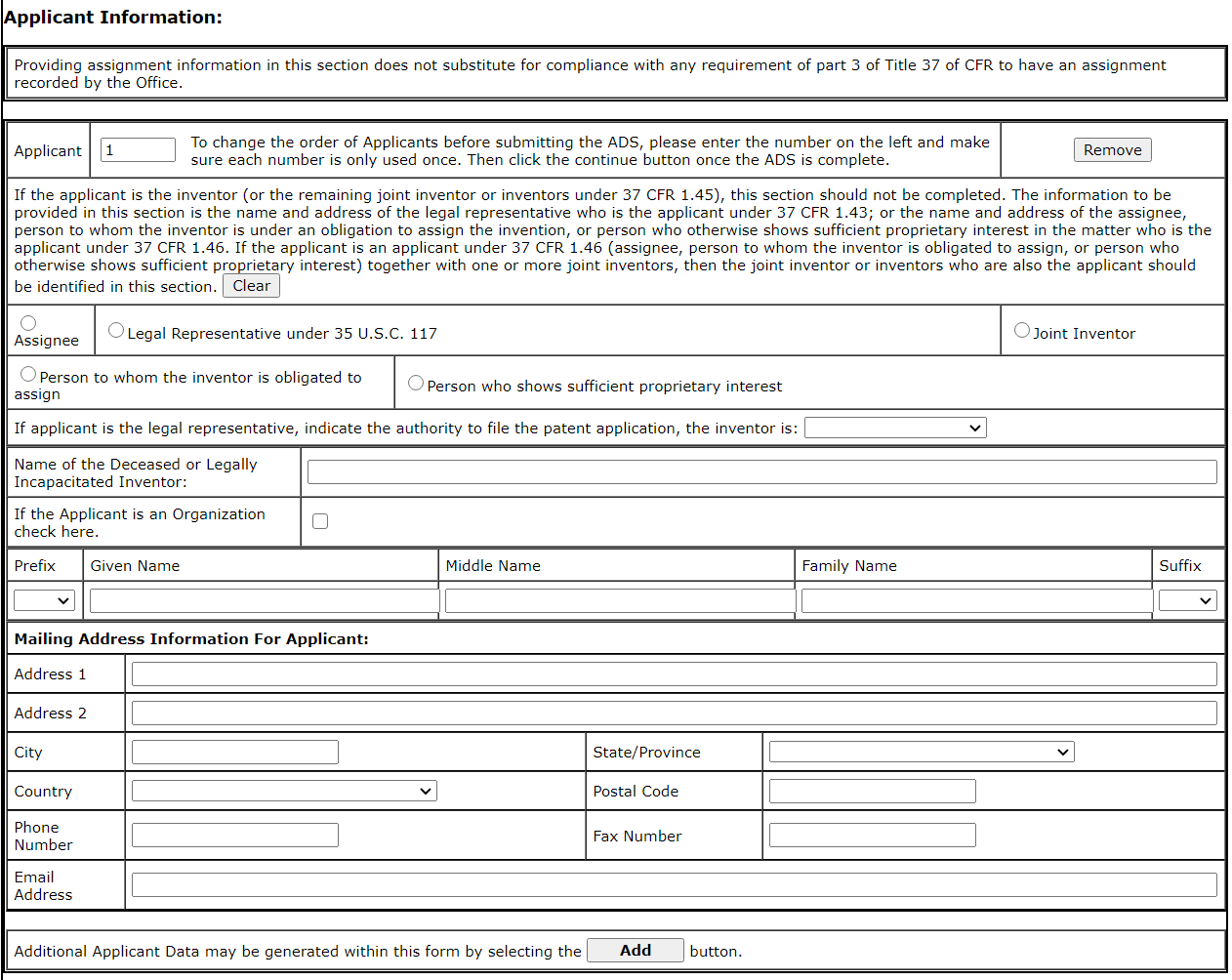
Skip some boxes, and you will find Applicant Information. This only applies if you are not filing the application in your (inventor’s) name. This happens when you want your company to be the patent owner as an assignee of your right to the patent as the inventor. Check “assignee” if you fill out this part.
Now, sign the form.
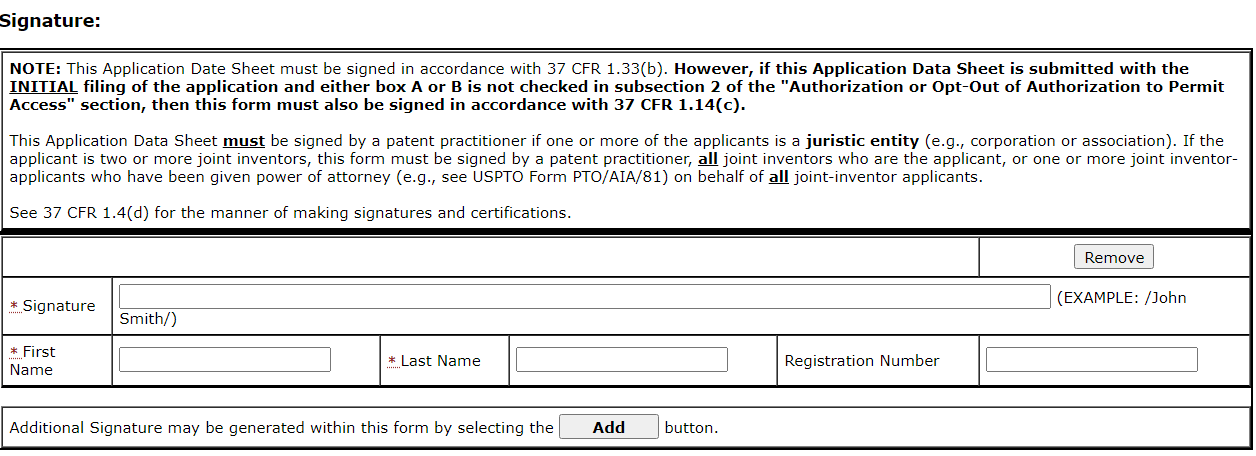
Two slashes (“/”) are required parts of your signature. Do not forget them.
If you don’t fill out every asterisked (*) blank, you can’t save and continue. See if you forgot one in case of some error messages.
After hitting “Continue” on your ADS page, you can see the progress of your application on the tab on the top, moved from “Application Data” to “Attach Document”.

Find “Choose File” button. You can access files on your computer from here. After selecting a computer file, you can choose Category and Document Description accordingly. To add more files, you hit “Add File” button.
You can have all your parts in one pdf file. It actually asks if your document contains multiple documents. If you hit “yes”, you can set page ranges for individual categories for each part of your application.
Required parts (find SB/16 form in the link provided above)
Optional part (if you qualify Micro Entity Status)
Your “Drawings” and “Specification” are your word documents printed or saved in PDF form. You should prepare these in the same format and style as the model patent you found in Google Patents.
“Provisional Cover Sheet” and “Certification of Micro Entity” are filled-out forms. The forms are available on Forms For Patent Applications Filed On Or After September 16, 2012 | USPTO.
Make sure you select correct “Category” and “Document Description”, and hit “upload and validate”. If there is no error in the files, you can hit “review”, then “continue”.
Your progress bar will move to Calculate Fees tab.
Make sure you select Small Entity or Micro Entity Status, whichever is appropriate for you. The selection is not automatic.
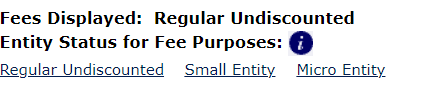
Once you choose your status for the fee calculation, you will choose “provisional” as shown below.
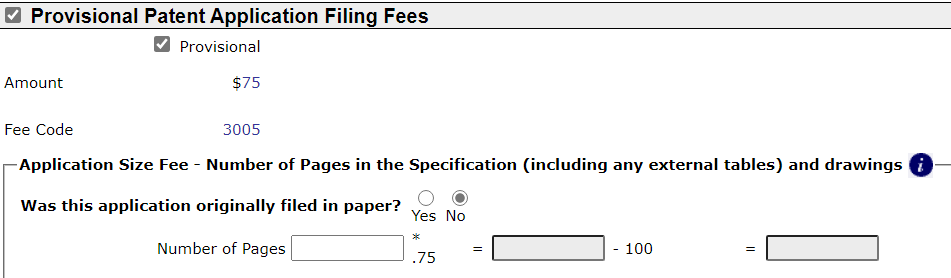
Now, all you have to do is make payment online. Although you can submit the documents without paying right now. Your application is officially filed only when the correct fees are paid.
Payment process is just like any online shopping.
After you make payment, make sure to view and save your filing receipt using the button available on the right side of the screen. The information available on the filing receipt will be used to communicate with the USPTO regarding your application in the future.
먼저 특허란, 이제껏 남들이 생각하지 못했던 물건이나 방식, 디자인 등(이하 편의상 “신기술” 혹은 “발명”)에 대해 배타적인 독점권을 정부로 부터 부여받는 권리입니다.
특허권은 미연방헌법에 명시되어 있을 정도로 그 역사가 긴데요.
[The Congress shall have power to] promote the progress of science and useful arts, by securing for limited times to authors and inventors the exclusive right to their respective writings and discoveries.
U.S. Constitution Section I Clause 8
그 오랜 역사 만큼 축적된 판례도 많고, 관습법 뿐만 아니라 매우 세부적인 법률과 규칙으로 아주 작은 부분까지 규정되어 있기에, 아주 공고하고 확고한 권리가 됩니다.
이 때문에 투자가치나 기업가치를 평가할 때 좋은 잣대가 되고, 많은 스타트업이나 Tech 기업들은 특허자산이 기업자산의 큰 부분을 차지하고 있습니다.
특허는 남들이 생각 못했던 것을 내가 처음으로 생각해냈다는 INVENTORSHIP(발명자의 권리)을 인정받는 절차이기 때문에, 제3자가 독립적으로 똑같은 것을 생각해낼 경우, 먼저 특허청에 출원(특허 신청서를 제출하는 행위)하는 쪽이 우선권을 가집니다.
물론 자신이 생각해낸 것을 남들은 절대로 못한다는 확신이 있다면, 출원 없이 기다려도 되겠죠. 하지만 이 경우에는 신기술을 제3자에게 공개하거나 사용해서는 안됩니다. 말 그대로 자신만 “알고” 있어야 하죠.
따라서, 발명이 세상에 불가피하게 공개될 수 밖에 없는 경우, 예를 들어 상업화를 준비하거나 논문을 쓰는 경우, 미리 특허 출원을 해두어야 합니다.
나라에서 특허를 주는 이유는 단순히 발명한 사람에게 신기술에 대한 권리를 무조건 독점하게 하려는 것이 아니라, 그 신기술에 대해 다른 사람들도 알고 더 발전시킬 수 있도록 하여 국가적인 기술 발전을 도모하기 위한 목적도 있습니다.
따라서, 특허권의 대가로 발명자는 신기술의 완전한 공개해야 합니다. 다시 말해, 신기술과 관련된 지식과 기술을 가진 보통의 사람이 특허 출원서를 읽고 누구의 도움 없이도 신기술을 그대로 모방할 수 있게끔 해야 합니다.
그렇다면 발명자에게는 너무 큰 손해가 아닌가 하는 분도 계시겠지만, 그 대가로 20년이라는 긴 세월동안 배타적인 권리를 부여 받기 때문에, 특히 리버스 엔지니어링 (reverse engineering) 이 가능하거나 영업비밀의 보호가 어려운 분야에서는 특허가 거의 유일하게 자신의 발명권을 지킬 수 있는 방법이 됩니다.
실제로 특허를 받기까지는 최소 3개월 이상 보통 1년 이상의 시간이 소요되고, 특허 심사관에게 신기술이 기존 기술과 어떻게 다르고 새로운지 설득하고, 특허권의 권리 범위를 명료하게 정리하는 등 많은 노력이 필요하기에 비전문가가 진행하기에 어려운 부분이 많습니다.
그 때문에 DIY를 위해서는 잠정 출원(Provisional Application)을 권해드립니다. 잠정 출원은 제3자가 같은 신기술에 대해 특허를 출원하는 경우를 대비해, 실제 심사는 진행되지 않지만, 미리 자신의 발명을 특허청에 제출해 두는 절차입니다.
잠정 출원을 하면 그 이후 1년의 기간 동안, 같은 기술에 대해서 제3자가 특허를 출원할 경우에 해당 기술에 대한 우선권을 가지게 될 뿐만 아니라, 실제 출원과 똑같은 Patent Pending (특허 출원) 이라는 법적 지위가 발생하므로, 공지를 통해 다른 사람들이 따라하는 것을 미연에 방지하거나, 경고문을 발송하는 등의 권리행사를 할 수 있습니다.
또 하나의 장점을 꼽자면, 잠정 출원은 세상에 공개되지 않습니다. 만약 기술의 추가적인 보완이 필요하거나 시기적으로 너무 이르다고 판단될 경우에는 단순히 잠정 출원을 방치할 수 있고, 이 경우 특허청은 해당 문서를 보관하지만 이를 공개하지는 않습니다.
잠정 출원은 심사가 진행되지 않는다고 했죠. 이 때문에 굳이 말하자면 아무거나 끄적끄적한 노트를 제출한다고 해도, 잠정 출원 요건은 만족할 수 있습니다.
하지만 나중에 실제 출원이 이루어질 때, 잠정 출원의 혜택(“우선권”)을 받으려면 (즉, 제3자가 자신의 잠정 출원일 이후에 똑같은 기술에 대해 특허 출원하는 경우에 대비하여 우선권을 획득하려면), 실제 출원의 내용이 잠정 출원 내용과 달라서는 안됩니다.
물론 여기서 다르다는 잣대는 문장 구조나 기타 출원서의 양식이나 서술 방식을 말하는 것이 아니고, 기재되어 있는 기술입니다.
예를 들어, 잠정 출원에 신기술이 A, B, C 라는 세가지 부분으로 이루어져 있었는데, 본 출원에서는 A, B, C, D 를 포함한다면, D에 대해서는 우선권이 주어지지 않게 됩니다. (참고로, 잠정 출원에 A, B, C를 공개해 두고, 본 출원에는 A, B 만 포함하는 것은 문제가 되지 않습니다.)
따라서, 서술 양식은 크게 중요하지 않지만 적어도 신기술에 대한 모든 내용을 포함하는 것은 중요합니다. 가장 쉬운 방법은 관련된 특허를 하나 Google Patents 에서 찾아서 해당 문서의 양식과 내용과 유사하게 작성하는 것이죠.
예를 들어, 내 발명이 흔들 의자에 관련된 것이라면, Google Patents 에서 rocking chair 를 검색 후, 좌측의 패널에서 Patent Office—미국, Language—영어를 선택해 주세요.
검색 결과에서 발명의 유사성과 출원 날짜를 고려하여 꽤 최근인 2010년에 출원된 특허를 선택해 보았습니다.
우측의 파란 영역에 Download PDF 를 클릭하시면 해당 문서 전체를 PDF 파일로 보실 수 있고, 그 밑으로 내려가다 보면 Status (상태)에 Abandoned 라고 표시된 것을 확인하실 수 있는데요.
심사를 거쳐 특허가 되지 않고 중간에 포기한 출원의 경우에도 이렇게 공개가 됩니다. 헌데 기왕이면 실제 특허를 받은 내용을 참고하면 더 좋겠죠?
이를 위해서는 검색 필드에서 Status—Grant 를 선택하시면 됩니다.
실제로 특허를 받은 것만 검색하니 아래와 같은 더 최근(2016년)의 출원이 첫 화면에 노출되네요.
특허 전문을 PDF로 받아서 확인해 보시면 크게 아래와 같은 부분으로 나누어져 있습니다.
말 그대로 요약입니다. 잠정 출원 시에는 꼭 필요하지 않습니다.
도면은 필요 요건은 아니지만, 형상이 있는 발명이라면 꼭 제출하는 편이 좋습니다. 말로는 설명하지 못하는 부분이 있을 수 있기 때문이죠. 만약 잠정 출원에 도면이 포함되지 않으면, 본 출원 시 도면을 추가하기가 어려울 수 있습니다.
3D CAD 이미지가 있다면 다양한 각도로 제출하는게 좋고, 정 도면을 그리기 어렵다면 프로토타입의 사진을 후작업하여 제출하는 방법도 고려해볼 수 있습니다.
각각의 Technical Field, Background, Summary, Description of Drawings, Detailed Description 에 맞추어 작성하시면 되겠죠.
신기술에 대한 논문 혹은 설명서를 작성한다는 기분으로 제3자가 신기술을 시도했을 때 본인이 실현한 신기술과 동등한 결과를 낼 수 있도록 적으셔야 합니다.
잠정 출원에는 요구되지 않지만, 본 출원에서는 특허권의 권리 범위를 정하는 매우 중요한 부분입니다. 잠정 출원 시 생략하셔도 좋습니다.
미특허청의 EFS 를 이용하여 집에서 인터넷을 통해 간편하게 제출할 수 있습니다. 특허청은 미국 연방정부 치고는 전산화가 잘되어 있는 편이고, 오랫동안 서비스를 해왔기 때문에, EFS는 겉보기에는 매우 구식이고 낡아 보이지만, 기능적으로는 잘 갖추어져 있습니다.
물론 사용자 편의는 전혀 고려되어 있지 않기 때문에, 출원 요건이 제대로 갖추어 지지 않은 상태에서도 제출 버튼을 누르면 제출 됩니다. 반대로 업로드한 문서 파일에 문제가 있거나 하면 바로 알려주기 때문에, 기술적으로는 신뢰하셔도 좋습니다.
EFS는 아래 링크를 이용하셔서 접속하실 수 있습니다. 참고로 Unregistered eFiler 로 별도 가입 없이 출원서 제출이 가능합니다.
United States Patent & Trademark Office (uspto.gov)
이름과 이메일 주소를 적고 New application/proceeding 을 선택 후
알맞은 특허 카테고리를 선택 후 Continue 버튼을 누르면 되겠죠.
기본적으로 잠정 출원은 Utility 만 가능하기 때문에 위와 같이 Utility—Provisional 선택하시면 됩니다. (Design Patent 는 우리가 흔히 아는 특허와는 달리 장식적인 요소를 보호합니다. 관련 글 참고 바랍니다.)
가장 먼저 출원정보(Application Data)를 제공하게 됩니다. Application data 는 반드시 정확하게 기입하셔야 하는데요. ADS (Application Data Sheet)에 포함된 많은 정보가 출원 필수요건이므로 주의를 요합니다.
위와 같이 Web-based ADS를 선택하면 별도의 ADS 양식을 다운받아 제출하지 않아도 되므로 편리합니다. 선택하시면 아래로 매우 긴 웹 양식이 나타납니다.
적으셔야 하는 부분은 다음과 같습니다.
우선 아래의 영역에 발명인에 대한 정보를 기입하세요.
다음으로 correspondence (연락처) 입니다. 혹시 영역이 보이지 않으면 “An Address is being …”의 좌측 박스가 체크되어 있는지 확인하세요. 이처럼 경우에 따라 해당 박스가 체크되어 있지 않으면 보이지 않는 영역이 있습니다.
여기까지는 연락처 정보에 가까운데요.
참고로 발명자가 직접 출원하시는 경우이기 때문에 위의 Inventor (발명인), Correspondence (연락처) 그리고 아래 등장할 Applicant (출원인) 모두 본인 정보를 적으시면 됩니다. 물론 출원인은 본인 명의 혹은 회사(법인인 경우) 명의로 진행하실 수 있습니다.
다음으로 본격적으로 발명에 대한 정보가 등장하는데요.
Title of the invention 은 말 그대로 발명을 대표하는 이름을 적어주시면 됩니다. 기왕이면 발명을 제대로 소개하면 좋겠지만, 위에서 모델로 참고 했던 “Rope Rocking Chair” 특허처럼 그다지 성의없는 제목도 문제가 되지 않습니다.
다음으로 Small Entity Status 를 claim (해당 box 에 체크) 해주시면 관납료를 50% 할인 받으실 수 있는데, 출원인이 대기업(종업원 500명 이상)이 아닌 이상 대부분 small entity 에 해당하므로 꼭 체크해 주세요.
추가로 small entity 중에서도 소득이 일정 수준이 안되면 micro entity 로 추가 할인 (추가 50%, 결과적으로는 관납료의 25% 납부)도 가능한데, Micro Entity Status Gross Income Limit | USPTO 에서 소득제한을 확인하실 수 있습니다.
만약 micro entity 에 해당한다면 Certification of Micro Entity Status 양식을 작성하여 제출하셔야 합니다. 해당 양식은 Forms For Patent Applications Filed On Or After September 16, 2012 | USPTO 에서 찾으실 수 있습니다. 이 양식을 상기 별도로 다운로드 후 서명해 PDF 파일로 업로드해야 하는데 업로드 하는 방법은 아래에서 설명합니다.
이후 몇가지 영역은 무시하셔도 좋고, 만약 회사 명의로 출원하신다면 아래의 Applicant 영역을 찾으셔서 회사 정보 정보를 기입하시면 됩니다. 미국 특허법상 발명에 대한 권리는 기본적으로 발명인에게 있기 때문에 회사는 assignee (권리 양수인)이 됩니다. Assignee에 체크하세요. 만약 본인 명의로 출원(applicant = inventor)하신 다면 아래 영역은 비워두시면 됩니다.
다음으로 아래 영역에 서명후 continue 클릭하시면 됩니다.
서명은 본인 이름을 두개의 / 사이에 쓰시면 됩니다. 두개의 / 도 서명의 일부이므로 본인이 입력하셔야 함을 꼭 기억하세요.
양식을 작성하면서 느끼셨겠지만 대체로 붉은색 * 표시(필수 기재 사항)만 작성하시면 됩니다. 다행히도 해당 부분이 미기입되면 에러가 발생하고 다음으로 넘어가지 않습니다.
ADS 작성 후 Continue 클릭하시면 아래 사진의 가장 상단에 위치한 탭에서 Application Data 를 지나 Attach Document 로 진행된 것을 확인하실 수 있습니다.
위의 화면에서 하단 영역에 Choose File 버튼으로 컴퓨터에 저장된 문서를 찾아서 알맞은 Category 와 Document Description 을 선택하면 되고, 파일을 추가하시려면 그때마다 Add File 버튼을 눌러주세요.
참고로, 모든 서류를 하나의 PDF 문서로 만든 후 업로드 하실 수도 있습니다. 이 경우 해당 문서가 multiple documents 를 포함한다는 질문에 Yes 로 응답하신 후 몇 페이지 부터 몇 페이지까지가 어떤 category 에 해당하는 지를 지정하시면 됩니다.
잠정 출원 시에 꼭 업로드해야 하는 문서 체크리스트
선택적으로 업로드할 문서 체크리스트
Drawings 과 Specification 는 모델 출원을 참고하여 작성하셨죠. 제출하실 때는 워드 문서가 아니라 PDF 파일로 만들어서 업로드 하시면 됩니다. 그 외 Provisional Cover Sheet 와 Certification of Micro Entity 는 괄호안의 양식 이름 참고하셔서 아래의 링크에서 PDF 로 다운로드 받아 사용하시면 됩니다.
Forms For Patent Applications Filed On Or After September 16, 2012 | USPTO
해당 양식도 세부적인 차이가 있는 것을 알 수 있는데, 보통 SB/16 의 경우 EFS-Form 을 사용하시면 되고, SB/15 는 Gross income basis 가 해당 됩니다. 해당 양식 기입하는 방법은 구글에서 “Guidance for filling out Micro Entity Status Form” 처럼 검색하시면 USPTO에서 직접 업로드한 유튜브 비디오 instruction 을 찾으실 수 있습니다.
모든 파일과 상응하는 Document Description를 선택하셨으면 Upload and Validate 버튼을 누르시면 되고, 다음으로 업로드된 파일 목록을 검토 (Review) 후, 계속해서 Continue 누르시면 Calculate Fees 탭으로 이동합니다.
관납료를 계산하실 때 Small 혹은 micro 에 해당한다면 반드시 해당 항목(아래 참고)을 클릭하셔야 계산에 반영됩니다.
Micro Entity를 클릭 하신 경우, 아래와 같이 표시된 화면의 Provisional 박스에 체크하시면 됩니다.
이 다음으로는 결제 및 제출만 남았는데, 당장 결제하지 않으셔도 제출은 가능하지만, 공식적으로 우선권 날짜를 받으시려면 반드시 결제를 하셔야 합니다.
결제는 온라인에서 쇼핑하듯이 신용카드 결제하시면 되기 때문에 별도 설명이나 안내는 필요 없을 듯 하구요.
출원서 제출 후 마지막 화면 우측 메뉴에서 접수증 저장 버튼을 이용하셔서 접수증 보관해 두는 것 잊지 마시기 바랍니다. 접수증에 적혀 있는 출원번호 외 기타 정보는 본출원시 필요하므로 잘 보관하셔야 합니다.
이후 본 출원을 대비해서는 Drawings 와 Specification 에 발명을 어떻게 잘 설명하는지가 중요합니다. 발명과 기술의 종류에 따라 너무 다양하기 때문에 모델이 될 만한 특허를 찾아서 참고하는 것으로 설명을 대체했지만, 아무래도 부족할 수 밖에 없습니다.
이후 본 출원까지 계획하고 있지만 경제적 어려움이나 기타 사유로 전문가의 도움을 받기 어려우신 분들은 무료 상담 신청하셔서 해당 발명에 대한 조언을 받으시면 좋겠습니다.
저희 IPfever 의 무료 상담은 단순히 고객 정보를 수집하는 과정이 아니라, 실제로 적용 가능한 법적 조언을 포함하여 필요할 경우 본인이 직접 특허/상표를 출원하는 방법도 안내해 드리고 있습니다.