Author: Young Jeon, Esq.

  • Trademark Clearance Search

    Trademark Clearance Search

    It is absolutely necessary to find out if there is anyone using your mark prior to your use. A clearance search is often performed through proprietary services, which often search not only state and federal registrations but also common law trademarks. Typically, a better service costs more; but depending on your situation a simple Google search may suffice.

    Typically, a clearance search provides lists of all current state, federal, common law trademarks that are identical or similar to your mark. Unless your mark is very unusual, you will face a number of identical and similar trademarks in use. Even if there is an identical trademark registered and used, it does not necessarily mean that you can’t use the mark; however, it is also true that even if there is no identical trademark, you might not be able to use the mark. At the end it all comes down to whether your use of the mark would infringe other trademark owner’s rights.

  • Trademark Registration: do I need to hire an attorney?

    Trademark Registration: do I need to hire an attorney?

    Getting a trademark, you can either “do it yourself” or hire a professionals. DIY option describes not only filing directly via TEAS at USPTO.gov but also using commercial services under $100.

    Let’s compare these two options.

    Do it yourself Professional Help
    Mark Your choice of wording and design Likely a better wording and design
    Registration online trademark search/registration via your representative
    Cost USPTO fees + $100 commercial service fees USPTO fees + up to $2,000 attorney fees + design cost

    Trademark registration is not too complicated.

    Nonetheless, mistakes can cost your time and money. If you are not going to hire an attorney, you should read and watch everything on USPTO’s Trademark Basics before you proceed. On a side note, even if things go smoothly while registering trademark, lawyers can improve the strength of the registered trademark significantly and designers will give your logo/design a professional look.

    USPTO offers an online application form through TEAS (Trademark Electronic Application System).

    There are various forms including TEAS plus, TEAS RF (Reduced Fee), and TEAS regular application types. Latter forms are subject to higher fees but offers some flexibility to applicants. Assuming you don’t make any mistake in filling out the form, you can save up to $100 by choosing TEAS plus. TEAS forms are web-based, guided, multi-page forms that anyone can learn the process as-you-go.

  • Standard Character mark v. Special Form mark

    Standard Character mark v. Special Form mark

    There are mainly two types of trademark, a standard one and a stylized one.

    Coca-cola_stylized_logo

    A standard one (called a standard character mark) establishes your trademark rights to the written words of the mark whereas a stylized one (called a stylized/design mark) to the expression of the words in a certain way.

    For example, “Coca-Cola” is a brand name of a certain soda drink, registered to the Coca-Cola Company. But you more often see the name in a particular style as shown here.

    Nowadays, the use of stylized logos and designs is very common because it effectively sets apart the company/brand from competitors’.

    A common choice is Standard Character.

    Although virtually all companies use at least some design/style elements in their trademark, still most of the companies register their trademark in a standard character format. Why?

    1. They don’t want their trademark right to be limited to a specific design. In fact, if you registered your brand name in a standard character format, any style/design of that registered name can’t be used by your competitors.
    2. Also, once registered as a stylized/design mark you can’t change the design or style of the mark. Companies often update their design and style elements to modernize them.

    Thus, it’s is a rule of thumb that a standard character format affords a better protection.

    A Styled/Design Mark works a bit differently.

    IPfever_logo_example
    JPfever_example

    Let’s say IPfever registered a stylized trademark: After a few years, a website devoted to teaching Japanese language and culture dubs itself Japanese Fever, “JP fever” in short, and starts using this logo:.

    Do you see any problem? Although they changed a letter, they look too similar. There’s likely an infringement case.

    However, if IPfever were registered as standard character, it would’ve been a different story. Because “fever” in Japanese Fever can be considered as a descriptive word for passion and enthusiasm for Japanese culture, it likely has a leeway.

    jpfever_example

    But it should be noted that stylized/design marks have their own limitation. If Japanese Fever  , I say this one differs in style so much to escape from a potential trademark infringement claim.

    You have to choose, but choose wisely.

    You might say you would just register both standard character and design marks. Problem solved? Well, it’s not that simple.

    You can’t claim “the coffee house” trademark for your coffee house because that’s what people call any coffee house. It’s reserved for everyone. But you may register this stylized/design mark.

    the_coffee_house

    You probably need to disclaim rights to the words, (meaning that others can literally use the same name) but it still protects you from something like this knock-off.

    the_coffee_shop

    So, figure out what’s the strength and weakness of your mark, and then choose wisely.

  • Trademark Office Action: how to respond

    Trademark Office Action: how to respond

    Office Action calls for a legal writing.

    When there is problem with your trademark application, the Office will issue an OA.  There could be multiple instances of OA per application while many trademarks get registered without any.

    Sometimes, a simple change to your application can fix the problem, so the only thing you need to is agreeing with the change. But often you must rebut the rejection with legal arguments. This provides you of an opportunity to clarify and strengthen your application (and the trademark), but a wrong response could render the trademark unenforceable or nominal.

    You must understand the reason for rejection clearly and respond to every issue to the full extent. You might find it helpful to review similar OAs and corresponding responses from another applicants on the TSDR (Trademark Status & Document Retrieval), which is open to the public and FREE. Although you can borrow their legal argument and logic, you must apply them to your facts.

    Sometimes it’s not a good idea to proceed with responding office actions. Use free consultation to figure out whether it’s a good idea or not. You may also get a rough idea about cost and timeline.

  • Trademark Office Action 상표 의견 제출 통지서

    Trademark Office Action 상표 의견 제출 통지서

    상표권 출원 후 상표권 관련 문제 혹은 행정상에 문제가 있을 경우, 특허청에서 의견 제출 통지서(Office Action 혹은 “OA”)를 발급 합니다.

    하나의 상표 등록 절차에서 OA가 여러차례 발생할 수도 있고, 반대로 OA 없이 바로 등록되는 경우도 많죠.

    때로는 간단한 정보의 추가 기입이나 변경으로 해결되는 경우도 있으므로, 심사관이 출원자의 동의를 받거나 임의로 수정하기도 합니다.

    하지만 보통의 경우에는 심사관이 보기에 상표 등록이 부적절하다고 판단할 때 의견 제출을 요구하므로 이에 대한 반론이 필요합니다. 이때 추가되는 의견은 상표 출원 기록의 일부가 되므로 상표권의 효력이나 범위에 영향을 줄 수 있고, 따라서 권리의 범위를 불필요하게 축소시키거나 제한하지 않도록 주의가 필요합니다.

    먼저, 왜 의견 제출 통지서가 발급되었는지 이유를 정확히 파악하고, 그러한 모든 이유에 대해 의견을 제출하셔야 합니다. OA 및 해당 출원자의 의견은 모두 공공기록이므로 비슷한 상표에 대해 비슷한 이유로 발급된 OA를 찾아 살펴보면 도움이 될 수 있습니다. 이러한 기록은 특허청의 TSDR (Trademark Status & Document Retrieval) 을 통해 무료로 검색 및 열람하실 수 있습니다.

    과연 OA를 진행해야 할지, 출원을 포기하는 게 나을지 고민하는 단계부터 전문가의 도움이 필요합니다. 무료 상담을 통해 진행 타당성부터 확인하시고 비용에 대한 견적도 받아 보시기 바랍니다.

  • 미국 시장에서 사용할 브랜드/상표 TIP

    미국 시장에서 사용할 브랜드/상표 TIP

    상표를 결정할 때 중요한 것은 경쟁 상표와의 차별성입니다.

    예를 들어, 인터넷 검색 엔진의 이름을 “네이바”이나 “고글”로 짓는다면 여러가지 문제가 발생하겠죠. 마찬가지로 현재 사용되고 이름이 아니더라도 불필요한 혼선을 줄 수 있으면 좋지 않습니다. “카이스트 검색” 같은 이름이 그런 예죠.

    이러한 문제들을 피하기 위해서 기존에 사용되는 상표에 대해 조사가 필요합니다. 가장 유효한 방법은 아무래도 인터넷 검색이죠. 간단한 네이버, 구글 검색을 통해서 해당 분야에서 이미 사용되고 있는 상표를 살펴보고, 마음에 둔 상표와 유사한 상표가 있는지 쉽게 알아 볼 수 있습니다.

    비슷한 이름은 피할 수록 좋습니다. 기존의 상표나 해당 분야에서 일반적으로 쓰이는 명칭 등은 절대로 피하세요. 

    상표는 독특할 수록 좋습니다.

    예를 들어, 한식당의 이름을 “Korean Food Restaurant” 이라고 이름 짓는 것은 좋지 않습니다. 물론 그렇게 짓는 것은 자유입니다. 다만 다른 음식점이 같은 이름을 사용해도 막을 권리가 없습니다.

    창의력을 발휘하세요. “코닥” 과 같은 이름은 훌륭한 상표의 본보기 입니다. 짧으면서도 튀고 외우기도 쉽죠. 역으로 우리 주변의 흔한 단어도 훌륭한 상표가 될 수 있습니다. 미국의 “애플” 사의 상호의 경우, 사과라는 뜻의 흔한 영단어임에도 불구하고 컴퓨터 및 전자제품을 위한 훌륭한 상표가 되었습니다.

     상표를 적절히 선택했는지 확신이 없으신가요?

    인터넷과 상표

    요즘은 상표를 정할 때 인터넷 도메인 먼저 등록하는 경우가 많습니다.

    해당 도메인이 이미 등록되어 있을 경우에는 현재 도메인을 가진 사람에게 구입해야 하는 등 많은 비용과 노력이 필요할 수 있기 때문입니다. 한글 도메인은 호환성의 문제 등 여러가지 문제가 있으므로 영문명으로 등록하시는게 좋죠.

    [브랜드/상표/상호의 영문 표기].com 도메인은 반드시 등록하시기 바랍니다. 신규 도메인의 경우 일년에 $10에서 $20 정도의 등록 비용만 지불하면 되므로 비용 부담도 적죠. 혹, 이미 해당 도메인이 등록되어 있다면 상표명을 변경하거나 해당 도메인을 구입할 수  있는 지 알아보셔야 합니다.

    더 자세한 내용은 좋은 상표/브랜드명 정하기를 통해 알아 보세요.

  • 미국의 상표법: “사용 주의”

    미국의 상표법: “사용 주의”

    재밌는 사례로 시작해 볼까요.

    애플이 2007년 1월 아이폰을 데뷰하기 전부터 “i-” 로 시작하는 많은 제품들이 있었다는 것 기억하시나요? 예를 들면 iMac 시리즈는 이미 1998년에 처음, 그리고 iPod 은 2003년에 출시된 제품입니다.

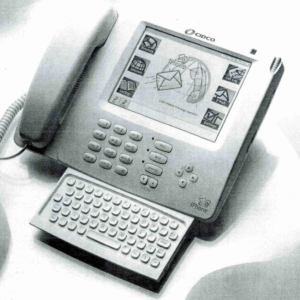
    헌데, 애플보다 잘 알려지지는 않았지만 InfoGear Technology Corp. 라는 미국 회사가 있었습니다. iPhone 이라는 인터넷 전화기를 개발사 입니다.

    네, 바로 그 유명한 iPhone 이름 그대로 입니다.

    specimen in InfoGear's trademark application
    specimen in InfoGear’s trademark application

    물론, 애플이 i- 로 시작하는 제품을 만든 배경에는 아무런 문제가 없습니다. 실제로 iMac 은 Digi International Inc. 라는 회사가 1995에 등록하여 소유하고 있던 상표를 애플에서 1998년에 구입하여 사용한 바 있지요.

    그런데, iPhone 은 어떨까요? 미특허청 기록에 따르면 InfoGear 에서 1997년 부터 사용한 이 상표는 1999년 부로 상표 등록되었습니다. 애플이 처음으로 “iPhone” 의 상표 등록을 출원한 것이 2007년 1월 8일 바로 아이폰 출시 전날 입니다.

    이게 있을 수 있는 일인가요? 예상되는 것처럼 애플은 “iPhone” 상표에 대한 침해 소송을 당했습니다. 이때 이미 InfoGear는 Cisco 에 인수된 이후였기 때문에, 소송 당사자는 Cisco 였지만요.

    만약 시스코의 애플에 대한 상표 소송이 끝까지 갔다면, 우리는 아마도 iPhone 대신 iPod 5G 를 손에 들고 있을지도 모릅니다.

    하지만 그 전에 시스코는 iPhone 상표권을 애플이 사용할 수 있도록 허락합니다. 협상 테이블에서 어떤 이야기가 오고 갔을지는 알 수 없죠.

    하지만 애플은 아마도 시스코가 iPhone 상표를 사용하지 않고 있으므로 자신들의 iMac 이나 iPod 등의 제품의 인지도에 따라 i- 는 자신들에게 귀속된다고 주장했을 겁니다.

    그럼에도 불구하고 시스코가 실제로 iPhone을 만들어 판매했다면 시스코가 절대적으로 유리한 상황이죠.

    여러분도 상표권을 소유하기 위해서는 실제로 “사용” 해야 한다는 것 잊지 마시기 바랍니다.

    물론 미특허청에서는 선출원 (Intent-to-Use Application, ITU) 라는 제도를 마련하여, 상품을 개발/기획하는 단계에서 상표를 미리 출원할 수 있도록 하고 있습니다. 물론 실제 등록은 상표를 사용한 후에 이루어지지만, 상표에 대한 심사는 미리 진행할 수 있고, 그만큼 해당 상표를 사용할 수 있다는 확신을 가지고 일을 진행할 수 있겠죠.

    이 모든게 바로 미국의 상표법은 “사용 주의”를 따르기 때문입니다. 사용하지 않으면 상표권이 발생하지 않고, 등록을 위해서는 제품 광고나 예고 등이 아닌 실제 사용 (간단히 말하면, 상표를 부착한 상품이 판매/유통 등의 목적으로 주경계를 넘어야 합니다) 이 미리 이루어져야 합니다.

  • You’ve got to “use” your trademark

    You’ve got to “use” your trademark

    Let’s take a look at an interesting story:

    By the time Apple Inc. debuted iPhone in January 2007, the prefix “i” had already become a thing of Apple. The inauguration of iMac series dates back in 1998. In 2003, iPod was a mega hit.

    Lesser known than Apple, however, there was a startup called InfoGear Technology Corporation, which developed an internet phone technology, called “iPhone.”

    Yes, iPhone™ by InfoGear.

    specimen in InfoGear's trademark application
    specimen in InfoGear’s trademark application

    Of course, there’s nothing suspicious about Apple’s iMac; the iMac trademark was first registered in 1995 by Digi International Inc. which assigned the trademark to Apple in 1998. Here, Apple did a right thing; it bought the iMac trademark before announcing iMac.

    But, how about iPhone? Based on the USPTO’s record, InfoGear used the iPhone trademark from 1997, and it was registered in 1999. Apple filed its iPhone trademark application in January 8th, 2007. (Steve Jobs unveiled iPhone to the world the next day).

    Can Apple do that? Absolutely “NO” said Cisco who brought a lawsuit against Apple based on its iPhone trademark purchased along with InfoGear.

    In all fairness, if Cisco proved its seriousness about iPhone in the court, we might now have “iPod 4G LTE Advanced” instead of “iPhone 7.”

    Who knows what Steve Jobs said to Cisco, but Cisco somehow agreed to a concurrent use of the iPhone trademark. (Apple probably challenged Cisco’s iPhone trademark by saying that “i” prefix had been associated with Apple product even before Cisco’s registration.) Well, assuming Cisco had a valid and enforceable trademark right, what could’ve happened?

    Cisco would say the iPhones sold by InfoGear and Apple were both communication devices, and customers would likely be confused. Of course, Apple would say they are totally different devices; but Apple likely loses on this account.

    As a counter, Apple could’ve argued that Cisco stopped using the trademark (thereby lost its right). Then, the followings become relevant: How many iPhone Cisco sold? How many people bought, used, knew or seen iPhone by Cisco? Had Cisco advertised iPhone? My guess is that Cisco purchased the iPhone trademark, but it really didn’t think about using it much.

    So, be aware that to own a trademark, you have to actually use it, which means placing your goods/services (bearing that mark) in the market.

    Trademark registration provides security. For example, companies often file intent-to-use (“ITU”) applications before making and selling new products. Without the ITU, mobile phone companies won’t be able to announce a flagship model months earlier than actual release, nor can they push an advertising campaign for a new product before they make sales. (Announcing or even advertising is not enough to establish a use of trademark under the trademark law.)

    Trademark registration provides security. For example, companies often file intent-to-use (“ITU”) applications before making and selling new products. Without the ITU, mobile phone companies won’t be able to announce a flagship model months earlier than actual release, nor can they push an advertising campaign for a new product before they make sales. (Announcing or even advertising is not enough to establish a use of trademark under the trademark law.)

  • (OLD) TEAS 화면 6: 서명

    (OLD) TEAS 화면 6: 서명

    2025년부터 USPTO의 새로운 전자출원시스템인 Trademark Center 의 사용이 의무화되었습니다. 아래의 내용은 참고만 하시기 바랍니다.

    미특허청 상표 출원 TEAS Plus 의 6번째 화면입니다.

    세가지 서명 방법 중 하나를 선택하실 수 있는데요. 현재 온라인 양식을 작성하고 계신 분이 상표권자가 되실 분 즉 출원인을 대행할 권한이 있으시면 직접 sign directly 를 통해 화면의 하단에 서명하시면 됩니다.

    그렇지 않을 경우에는, 상표권자 본인이나 그 외 권한이 있는 분에게 email 을 보내거나 같은 내용을 종이에 출력 후 서명 받을 수 있습니다.

    체크박스는 일단 전부 동의하시지 않으면 진행이 안됩니다. 주요 내용은 허위 사실을 기재할 경우 법적 처벌을 받는다는 내용이죠.

    서명은 미특허청에서 말하는 S-signature 형태로 하시면 됩니다. 가장 쉬운 방법은 /young jeon/ 와 같이 이름과 성을 “/” (슬래쉬, 키보드의 마침표 오른쪽에 있는 기호입니다) 안에 가두어서 기재하시면 됩니다. 그 옆의 날짜란은 클릭하시면 자동으로 오늘의 날짜로 바뀌구요.

    다음으로 서명하시는 분의 이름과 position 을 적으시면 되는데, 아무래도 회사에서 상표를 등록하는 경우가 많으니 Signatory’s Position은 직책이 되겠죠. 상표권자가 개인이고 직접 등록하시는 경우에는 Owner라고 적으셔도 되고, 만약 두명 이상의 개인/법인이 공동으로 소유하는 상표의 경우에는 먼저 한분이 기입하시고, 다음분은 add signatory 버튼을 사용하셔서 추가 기재하시면 됩니다.

    마지막으로 전화번호는 의무기재 사항은 아니니 비워두셔도 무방합니다.

    이 다음은 Continue가 아닌 Validate 누르시고, 마지막으로 확인 및 결재하시면 됩니다. 결재 절차는 별도의 포스팅을 하지 않으려 합니다.

  • (OLD) TEAS 화면 5: 연락처

    (OLD) TEAS 화면 5: 연락처

    2025년부터 USPTO의 새로운 전자출원시스템인 Trademark Center 의 사용이 의무화되었습니다. 아래의 내용은 참고만 하시기 바랍니다.

    여기서는 심사 및 등록을 위한 연락처를 확인합니다.

    미특허청으로부터 출원/심사/등록 을 위한 서신을 받고자 하는 주소가 이미 기입하신 출원인 정보와 다르지 않다면 그대로 입력하시면 되고, 아니라면 이 화면에서 다른 우편주소를 지정하셔도 됩니다.

    다만, 이메일 주소를 입력하고 체크박스를 확인하면 미특허청에서는 따로 종이로 된 서신을 보내지 않고, 이메일로 모든 공지를 발송하게 됩니다. 이 경우에도, 등록이 종료된 후, 등록증은 우편으로 발송이 되므로 그 부분은 염려하지 않으셔도 됩니다.